REST API reference
Page summary:Strapi's REST API automatically generates endpoints for content-types to fetch, create, update, and delete documents using GET, POST, PUT, and DELETE methods, with support for filtering, sorting, field selection, and relation population.
The REST API allows accessing the content-types through API endpoints. Strapi automatically creates API endpoints when a content-type is created. API parameters can be used when querying API endpoints to refine the results.
This section of the documentation is for the REST API reference for content-types. We also have guides available for specific use cases.
All content types are private by default and need to be either made public or queries need to be authenticated with the proper permissions. See the Quick Start Guide, the user guide for the Users & Permissions feature, and API tokens configuration documentation for more details.
By default, the REST API responses only include top-level fields and does not populate any relations, media fields, components, or dynamic zones. Use the populate parameter to populate specific fields. Ensure that the find permission is given to the field(s) for the relation(s) you populate.
The Strapi Client library simplifies interactions with your Strapi back end, providing a way to fetch, create, update, and delete content.
Endpoints
For each Content-Type, the following endpoints are automatically generated:
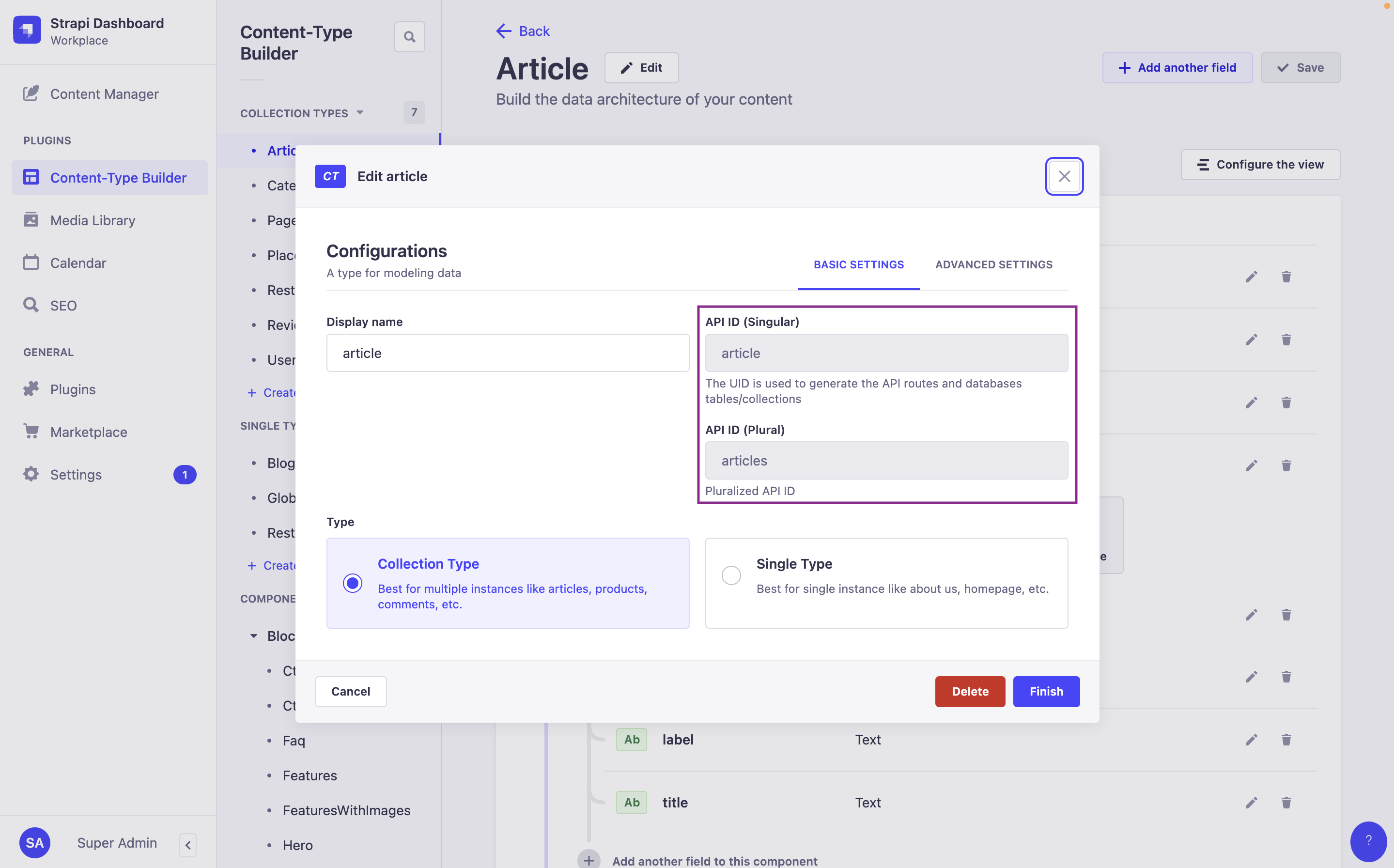
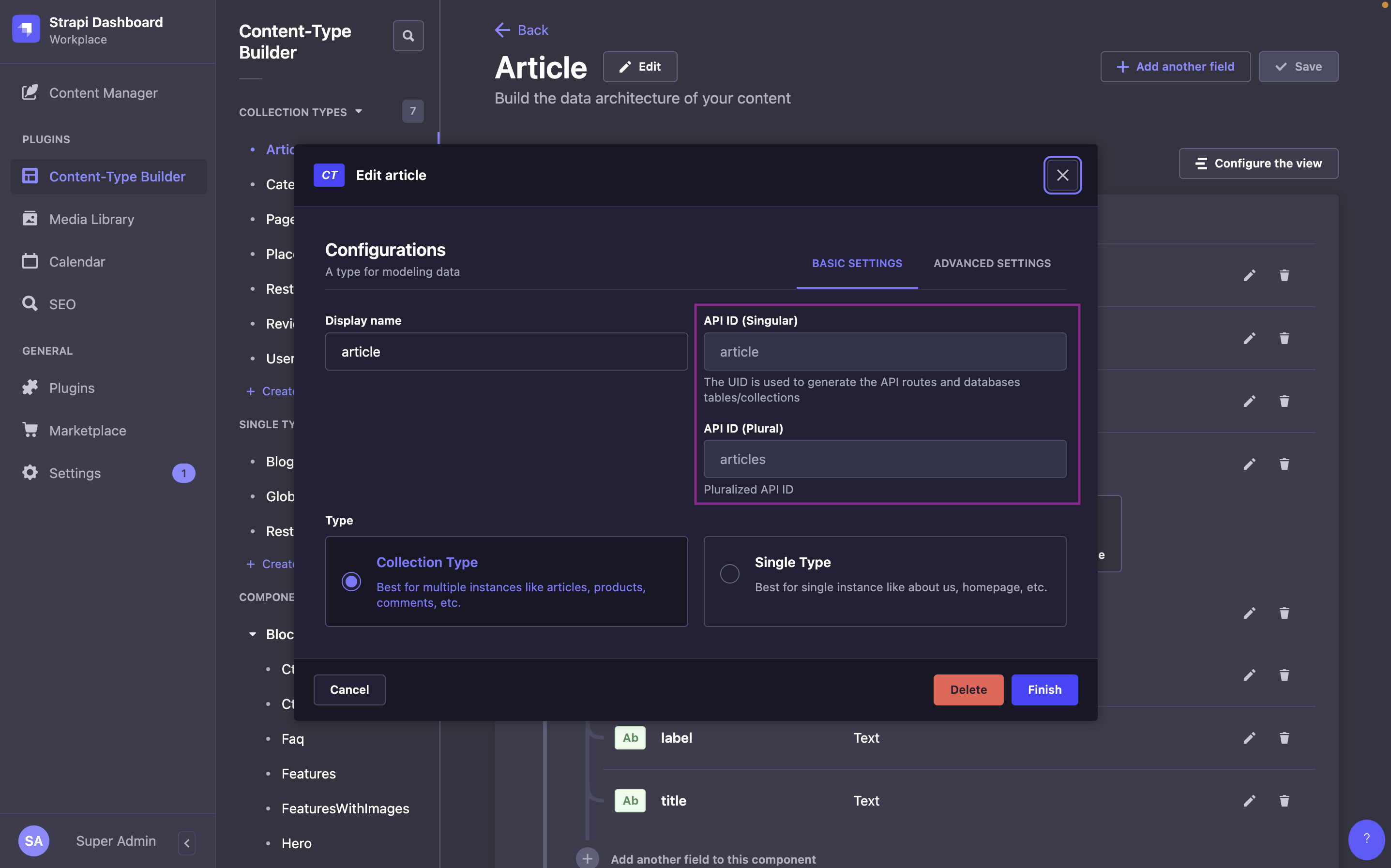
Plural API ID vs. Singular API ID:
In the following tables:
:singularApiIdrefers to the value of the "API ID (Singular)" field of the content-type,- and
:pluralApiIdrefers to the value of the "API ID (Plural)" field of the content-type.
These values are defined when creating a content-type in the Content-Type Builder, and can be found while editing a content-type in the admin panel (see User Guide). For instance, by default, for an "Article" content-type:
:singularApiIdwill bearticle:pluralApiIdwill bearticles
- Collection type
- Single type
| Method | URL | Description |
|---|---|---|
GET | /api/:pluralApiId | Get a list of documents |
POST | /api/:pluralApiId | Create a document |
GET | /api/:pluralApiId/:documentId | Get a document |
PUT | /api/:pluralApiId/:documentId | Update a document |
DELETE | /api/:pluralApiId/:documentId | Delete a document |
| Method | URL | Description |
|---|---|---|
GET | /api/:singularApiId | Get a document |
PUT | /api/:singularApiId | Update/Create a document |
DELETE | /api/:singularApiId | Delete a document |
The Upload package (which powers the Media Library feature) has a specific API accessible through its /api/upload endpoints.
Components don't have API endpoints.
Requests and responses
Strapi 5's Content API includes 2 major differences with Strapi v4:
- The response format has been flattened, which means attributes are no longer nested in a
data.attributesobject and are directly accessible at the first level of thedataobject (e.g., a content-type's "title" attribute is accessed withdata.title). - Strapi 5 now uses documents and documents are accessed by their
documentId(see breaking change entry for details)
Requests return a response as an object which usually includes the following keys:
-
data: the response data itself, which could be:- a single document, as an object with the following keys:
id(integer)documentId(string), which is the unique identifier to use when querying a given document,- the attributes (each attribute's type depends on the attribute, see models attributes documentation for details)
meta(object)
- a list of documents, as an array of objects
- a custom response
- a single document, as an object with the following keys:
-
meta(object): information about pagination, publication state, available locales, etc. -
error(object, optional): information about any error thrown by the request
Some plugins (including Users & Permissions and Upload) may not follow this response format.
The following sections detail each generated endpoint.
Get documents
In Strapi 5 the response format has been flattened, and attributes are directly accessible from the data object instead of being nested in data.attributes.
You can pass an optional header while you're migrating to Strapi 5 (see the related breaking change).
List documents
Returns a paginated list of documents. Supports filtering, sorting, field selection, and relation population.
field:asc or field:desc1- cURL
- JavaScript
curl 'http://localhost:1337/api/restaurants' \
  -H 'Authorization: Bearer <token>'
const response = await fetch(
  'http://localhost:1337/api/restaurants',
  {
    headers: {
      Authorization: 'Bearer <token>',
    },
  }
);
const data = await response.json();
{
  "data": [
    {
      "id": 2,
      "documentId": "hgv1vny5cebq2l3czil1rpb3",
      "Name": "BMK Paris Bamako",
      "Description": null,
      "createdAt": "2024-03-06T13:42:05.098Z",
      "updatedAt": "2024-03-06T13:42:05.098Z",
      "publishedAt": "2024-03-06T13:42:05.103Z",
      "locale": "en"
    },
    {
      "id": 4,
      "documentId": "znrlzntu9ei5onjvwfaalu2v",
      "Name": "Biscotte Restaurant",
      "createdAt": "2024-03-06T13:43:30.172Z",
      "updatedAt": "2024-03-06T13:43:30.172Z",
      "publishedAt": "2024-03-06T13:43:30.175Z",
      "locale": "en"
    }
  ],
  "meta": {
    "pagination": { "page": 1, "pageSize": 25, "pageCount": 1, "total": 2 }
  }
}
Get a document
In Strapi 5, a specific document is reached by its documentId.
Get a document
Returns a single document by its documentId. Supports field selection and relation population.
restaurants)- cURL
- JavaScript
curl 'http://localhost:1337/api/restaurants/znrlzntu9ei5onjvwfaalu2v' \
  -H 'Authorization: Bearer <token>'
const response = await fetch(
  'http://localhost:1337/api/restaurants/znrlzntu9ei5onjvwfaalu2v',
  {
    headers: {
      Authorization: 'Bearer <token>',
    },
  }
);
const data = await response.json();
- 200 OK
- 404 Not Found
{
  "data": {
    "id": 6,
    "documentId": "znrlzntu9ei5onjvwfaalu2v",
    "Name": "Biscotte Restaurant",
    "Description": [
      {
        "type": "paragraph",
        "children": [{ "type": "text", "text": "Welcome to Biscotte restaurant! Restaurant Biscotte offers a cuisine based on fresh, quality products." }]
      }
    ],
    "createdAt": "2024-02-27T10:19:04.953Z",
    "updatedAt": "2024-03-05T15:52:05.591Z",
    "publishedAt": "2024-03-05T15:52:05.600Z",
    "locale": "en"
  },
  "meta": {}
}
{
  "data": null,
  "error": {
    "status": 404,
    "name": "NotFoundError",
    "message": "Not Found",
    "details": {}
  }
}
Create a document
If the Internationalization (i18n) feature is installed, it's possible to use POST requests to the REST API to create localized documents.
While creating a document, you can define its relations and their order (see Managing relations through the REST API for more details).
With Draft & Publish enabled, a POST request without a status parameter creates the document and publishes it immediately. Pass ?status=draft to create it as a draft (see REST API: status).
Each entry you send for a dynamic zone must include __component with the target component's UID (for example shared.media). Strapi uses that field to pick the component schema when you create or update items in the zone; without it, writes can fail validation or return success without changing data. Use the UID shown in the Content-Type Builder for each component in the zone.
Create a document
Creates a new document and returns it. Send field values inside a data object in the request body.
draft to create the document as a draft, or published to publish it immediately. Default: published. See status.- cURL
- JavaScript
curl -X POST \
  'http://localhost:1337/api/restaurants' \
  -H 'Authorization: Bearer <token>' \
  -H 'Content-Type: application/json' \
  -d '{
    "data": {
      "Name": "Restaurant D",
      "Description": [
        {
          "type": "paragraph",
          "children": [{ "type": "text", "text": "A very short description goes here." }]
        }
      ]
    }
  }'
const response = await fetch(
  'http://localhost:1337/api/restaurants',
  {
    method: 'POST',
    headers: {
      Authorization: 'Bearer <token>',
      'Content-Type': 'application/json',
    },
    body: JSON.stringify({
      data: {
        Name: 'Restaurant D',
        Description: [
          {
            type: 'paragraph',
            children: [{ type: 'text', text: 'A very short description goes here.' }],
          },
        ],
      },
    }),
  }
);
const data = await response.json();
{
  "data": {
    "documentId": "bw64dnu97i56nq85106yt4du",
    "Name": "Restaurant D",
    "Description": [
      {
        "type": "paragraph",
        "children": [{ "type": "text", "text": "A very short description goes here." }]
      }
    ],
    "createdAt": "2024-03-05T16:44:47.689Z",
    "updatedAt": "2024-03-05T16:44:47.689Z",
    "publishedAt": "2024-03-05T16:44:47.687Z",
    "locale": "en"
  },
  "meta": {}
}
Update a document
- Even with the Internationalization (i18n) feature installed, it's currently not possible to update the locale of a document.
- While updating a document, you can define its relations and their order (see Managing relations through the REST API for more details).
With Draft & Publish enabled, a PUT request without a status parameter publishes the changes immediately. Pass ?status=draft to update the draft only (see REST API: status). This also applies to single types, where PUT /api/:singularApiId publishes the changes unless you pass ?status=draft.
Each entry you send for a dynamic zone must include __component with the target component's UID (for example shared.media). Strapi uses that field to pick the component schema when you create or update items in the zone; without it, writes can fail validation or return success without changing data. Use the UID shown in the Content-Type Builder for each component in the zone.
Update a document
Partially updates a document by documentId and returns its value. Send a null value to clear fields.
draft to update the draft only, or published to publish the changes immediately. Default: published. See status.- cURL
- JavaScript
curl -X PUT \
  'http://localhost:1337/api/restaurants/hgv1vny5cebq2l3czil1rpb3' \
  -H 'Authorization: Bearer <token>' \
  -H 'Content-Type: application/json' \
  -d '{
    "data": {
      "Name": "BMK Paris Bamako",
      "Description": [
        {
          "type": "paragraph",
          "children": [{ "type": "text", "text": "A very short description goes here." }]
        }
      ]
    }
  }'
const response = await fetch(
  'http://localhost:1337/api/restaurants/hgv1vny5cebq2l3czil1rpb3',
  {
    method: 'PUT',
    headers: {
      Authorization: 'Bearer <token>',
      'Content-Type': 'application/json',
    },
    body: JSON.stringify({
      data: {
        Name: 'BMK Paris Bamako',
        Description: [
          {
            type: 'paragraph',
            children: [{ type: 'text', text: 'A very short description goes here.' }],
          },
        ],
      },
    }),
  }
);
const data = await response.json();
{
  "data": {
    "id": 9,
    "documentId": "hgv1vny5cebq2l3czil1rpb3",
    "Name": "BMK Paris Bamako",
    "Description": [
      {
        "type": "paragraph",
        "children": [{ "type": "text", "text": "A very short description goes here." }]
      }
    ],
    "createdAt": "2024-03-06T13:42:05.098Z",
    "updatedAt": "2024-03-06T14:16:56.883Z",
    "publishedAt": "2024-03-06T14:16:56.895Z",
    "locale": "en"
  },
  "meta": {}
}
Delete a document
Delete a document
Permanently deletes a document by documentId. This action is irreversible.
restaurants)- cURL
- JavaScript
curl -X DELETE \
  'http://localhost:1337/api/restaurants/bw64dnu97i56nq85106yt4du' \
  -H 'Authorization: Bearer <token>'
const response = await fetch(
  'http://localhost:1337/api/restaurants/bw64dnu97i56nq85106yt4du',
  {
    method: 'DELETE',
    headers: {
      Authorization: 'Bearer <token>',
    },
  }
);
DELETE requests only send a 204 HTTP status code on success and do not return any data in the response body.
For production applications, be intentional about data fetching: use explicit population, limit population depth, and centralize population logic in route middlewares. See Building High-Performance Strapi Applications on the Strapi blog for a comprehensive guide.